The Gnote indicator I recently built turned out to be useful for many, so I polished another indicator app for sharing. Whether you simply browse a home NAS, share business files on a Samba/Windows server, or edit code on development servers through SSH or FTP, you may find this tool useful.
Showing posts with label linux. Show all posts
Indicator for Gnote
Tuesday, April 21, 2020 DJ Maraz
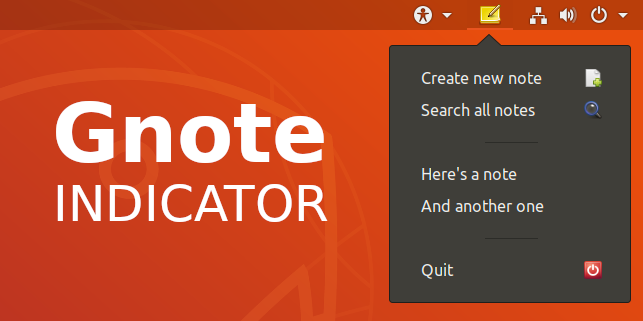
My favorite note-taking app Tomboy is no longer available in Ubuntu software repositories since 19.04. The similar Gnote lacks the handy indicator menu (also known as a tray icon) providing quick access to recently edited notes, so I rolled my own.
LED wall control with Raspberry Pi, part 1
Saturday, October 14, 2017 DJ Maraz
My IR camera project has been on hold for a while, because I've come up with other more interesting ideas, such as a LED wall. Initially I was inspired by the Aurora LED wall project, but I've realized that with the power of a Raspberry Pi and some Linux audio magic (PulseAudio and GStreamer) I could do much more.
blabbering / electronics / iot / kodi / linux / raspberrypi / ubuntu
Pre-enabling wifi and SSH on a Raspberry Pi SD card
Saturday, October 14, 2017 DJ Maraz
I've bought many Pi Zero W's, as they're just irresistibly cheap, so I have a lot of little Linuxes (or is the plural Linuces?) running around the house.
Unfortunately I keep forgetting how to pre-enable wifi and SSH on the SD card for a headless setup, and every time Google finds me old, incomplete tutorials, leaving me wondering why a Pi is not connecting, so it's best I finally write my own.
Infrared motion sensor camera with Raspberry Pi Zero W, part 2
Thursday, August 24, 2017 DJ Maraz
I decided to start with something simple like watching live video from the Pi camera on the local network. Raspbian comes with the raspivid utility, often used to simply record or pass camera picture to the HDMI output, but it's suitable for much more than that, especially with VLC, a multipurpose video toolkit.
iot / linux / raspberrypi / video
Infrared motion sensor camera with Raspberry Pi Zero W, part 1
Wednesday, August 16, 2017 DJ Maraz
I've been planning to build a prototype battery-operated motion sensor camera using the latest addition to the Raspberry Pi family tree, the Zero W, which is quite a remarkable device for something smaller than my thumb. Even the wireless antenna seems quite revolutionary. With WiFi and Bluetooth built in, this tiny computer will be more than perfect for many IoT projects.
blabbering / electronics / iot / linux / raspberrypi / video
Context menu additions for sharing files in S3 buckets
Tuesday, August 08, 2017 DJ Maraz
Some time ago I wrote about mounting Amazon S3 buckets into your home directory, and I wanted to get automatic public URLs for sharing some of the files I stuff in my cloud buckets. I got it working quite effortlessly by writing a small script and adding a context menu item to my file manager.
Compiling ffmpeg with Raspberry Pi hardware acceleration
Thursday, August 03, 2017 DJ Maraz
debian / linux / raspberrypi / video
Using systemd to mount S3 buckets into your home directory
Wednesday, August 02, 2017 DJ Maraz
If you do web development or use cloud storage for backups, you may have heard of Amazon S3 which offers dirt-cheap storage for both private and public use. Data in S3 is split into "buckets", which can be configured individually and may contain folder structures.
Then there's S3FS (S3 File System) that allows accessing S3 just as easily as local files. The few tutorials I found used /etc/fstab to auto-mount buckets, but that's not very smart on a desktop computer with multiple users, each managing buckets of their own. Besides, editing /etc/fstab can be very dangerous to newbies. That's why I looked for a way to achieve the same and more without touching any system-wide configuration. The only part that even needs sudo privileges is installing the S3FS package.
If you've used Linux servers or desktops for some time, you've probably heard of systemd, which allows creating your own background services (daemons) relatively easily. The real beauty about it is that adding user-specific services is equally easy, and in my experience they are more reliable than processes started using the classic "Startup Applications" tool.
I'll walk you through to combine those three building blocks into an automatic service that brings your S3 files right under your home directory on a Linux desktop computer. This should work as-is on any recent Debian, Ubuntu or a derivative operating system, and with some changes on others, too (forget about Windows, though).
Then there's S3FS (S3 File System) that allows accessing S3 just as easily as local files. The few tutorials I found used /etc/fstab to auto-mount buckets, but that's not very smart on a desktop computer with multiple users, each managing buckets of their own. Besides, editing /etc/fstab can be very dangerous to newbies. That's why I looked for a way to achieve the same and more without touching any system-wide configuration. The only part that even needs sudo privileges is installing the S3FS package.
If you've used Linux servers or desktops for some time, you've probably heard of systemd, which allows creating your own background services (daemons) relatively easily. The real beauty about it is that adding user-specific services is equally easy, and in my experience they are more reliable than processes started using the classic "Startup Applications" tool.
I'll walk you through to combine those three building blocks into an automatic service that brings your S3 files right under your home directory on a Linux desktop computer. This should work as-is on any recent Debian, Ubuntu or a derivative operating system, and with some changes on others, too (forget about Windows, though).
Subscribe to:
Comments (Atom)